Best Remote Fridge Temperature and Power-Outage Alerts for GLP-1 Pen Storage (2026): Wi-Fi, Hub and Cellular Monitors Compared
A fridge thermometer tells you what happened after you open the door. A remote monitor tells you while it’s happening, wherever you are, so you can move your pens to a cooler before they warm past their label range. This guide compares five monitors on what their makers publish, with one question in mind: when the power goes out, will the alert actually reach your phone? It covers storage logistics only. What your pen needs is set by its label and your pharmacist.
- ✓Set alerts to your label’s refrigerated range: unused GLP-1 pens are generally labeled for 36–46°F (2–8°C), and labels say not to use a pen that has frozen.
- ✓A low-temperature alert matters as much as a high one. A fridge that runs too cold can freeze pens near the back wall.
- ✓Wi-Fi and hub monitors need your internet to alert you. In an outage that means a UPS on the modem and router.
- ✓Cellular monitors work with no internet at the house and carry their own backup battery, but need a subscription.
- ✓Fridge walls and food weaken wireless signals. Test placement for a day before you rely on it.
- ✓If pens went out of range, use the monitor’s history (high, low, how long) when you call your pharmacist.
Disclosure: No company paid to be on this page, and the product links here are not affiliate links. Our separate gear page uses Amazon affiliate links and we may earn a commission if you buy through it. Every product fact below comes from the maker's own product, spec or FAQ page, checked November 10, 2026. We haven't tested these monitors or invented ratings. Prices and subscription fees change, so we don't list them.
Why a Remote Alert, Not Just a Thermometer
Our fridge thermometer comparison covers devices you read at the fridge: a min/max display, a Bluetooth sensor that alerts only while your phone is nearby, and a USB data logger. Those answer the question "did my fridge stay in range?" after the fact. A remote monitor answers a different one: "is it in range right now, while I'm at work, traveling, or asleep?"
That matters most in three situations. A fridge that quietly fails (a compressor that stops, a door left ajar) can warm for a whole workday before anyone notices. A power outage while you're away leaves you guessing how long the power was off. And a fridge that runs too cold can freeze pens stored near the back wall or the cooling vent, which labels say makes them unusable. Ready.gov says a closed refrigerator keeps food cold for about four hours without power. A remote alert gives you that window to act: come home, move pens to a cooler with wrapped gel packs, or ask a neighbor to.
How We Compared
- Alert path. How the reading gets from the fridge to your phone: Wi-Fi, a hub, or a cellular modem built into the device.
- Outage behavior. Whether the device keeps running on a battery when the power fails, and, separately, whether its alert can still get out.
- In-fridge fit. Rated temperature range, stated accuracy, and whether a probe lets the electronics stay outside the cold box.
- Alert options. Text, email, app, phone call; whether more than one person can get them.
- Ongoing cost. Whether a subscription is required (we say yes or no; we don't quote fees).
- Maker caveats. Anything the maker itself says about range, setup or what's needed for alerts to work.
Five Remote Monitors Compared
| Monitor | How it connects | In a power outage | In-fridge fit | Alerts | Power | Watch out for |
|---|---|---|---|---|---|---|
| Temp Stick (with AC power option) Temp Stick | Wi-Fi (2.4 GHz) straight to the cloud; no hub | AC-powered model alerts on power outages and switches to its AA batteries, but only if your modem and router are on backup power (the maker says so) | Sensor rated −40 to 140°F; maker states ±0.15°C; a model with an external probe is also sold | Text, email, app; multi-stage thresholds for different people; Wi-Fi lost/found alerts | 2 AA batteries (1+ year, per maker) or AC adapter | Wi-Fi alerts stop when your internet does |
| SensorPush HT1 + WiFi Gateway SensorPush | Bluetooth sensor to a plug-in Wi-Fi/Ethernet gateway (G1 or newer G2) | Gateway needs power and internet to alert; the sensor keeps logging and stores over two weeks of readings | Rated −40 to 140°F; ±0.3°C typical (0–60°C); readings every minute | App push notifications (G1 page lists email/SMS as coming); shared account logins | CR2477 coin cell, typically over 1 year; gateway on a 5 V adapter (G2 on USB-C) | Fridge walls and food cut Bluetooth range; the maker says to put the gateway close |
| YoLink Temperature Sensor with Probe (YS8004) + hub, with Power Fail Alarm (YS7106) YoLink (YoSmart) | LoRa radio to a YoLink hub, which connects to the internet | Power Fail Alarm sounds locally on AA backup; app alerts need the hub and network to stay up | Probe on a 1 m cable goes inside, sensor body stays outside; probe ±0.5°C from −10 to 47°C | App alerts through the hub; local siren on the Power Fail Alarm | Sensor: 2 lithium AAA; Power Fail Alarm: USB adapter + 2 AA backup | Hub sold separately and required; three pieces to set up |
| MarCELL Multisensor / MarCELL PRO MarCELL | Built-in 4G LTE cellular (Verizon or AT&T version); no Wi-Fi or internet needed | Internal rechargeable battery: up to 48 hours (Multisensor), 36–48 hours typical (PRO) | Base unit reads 0 to 120°F; the PRO takes a detachable probe (standard −20 to 127°F, 80 in cable) | Text, phone call, email; checks every 10 seconds (PRO: every 6) | AC adapter with internal Li-ion backup | Monthly cellular subscription required; needs a Verizon or AT&T signal |
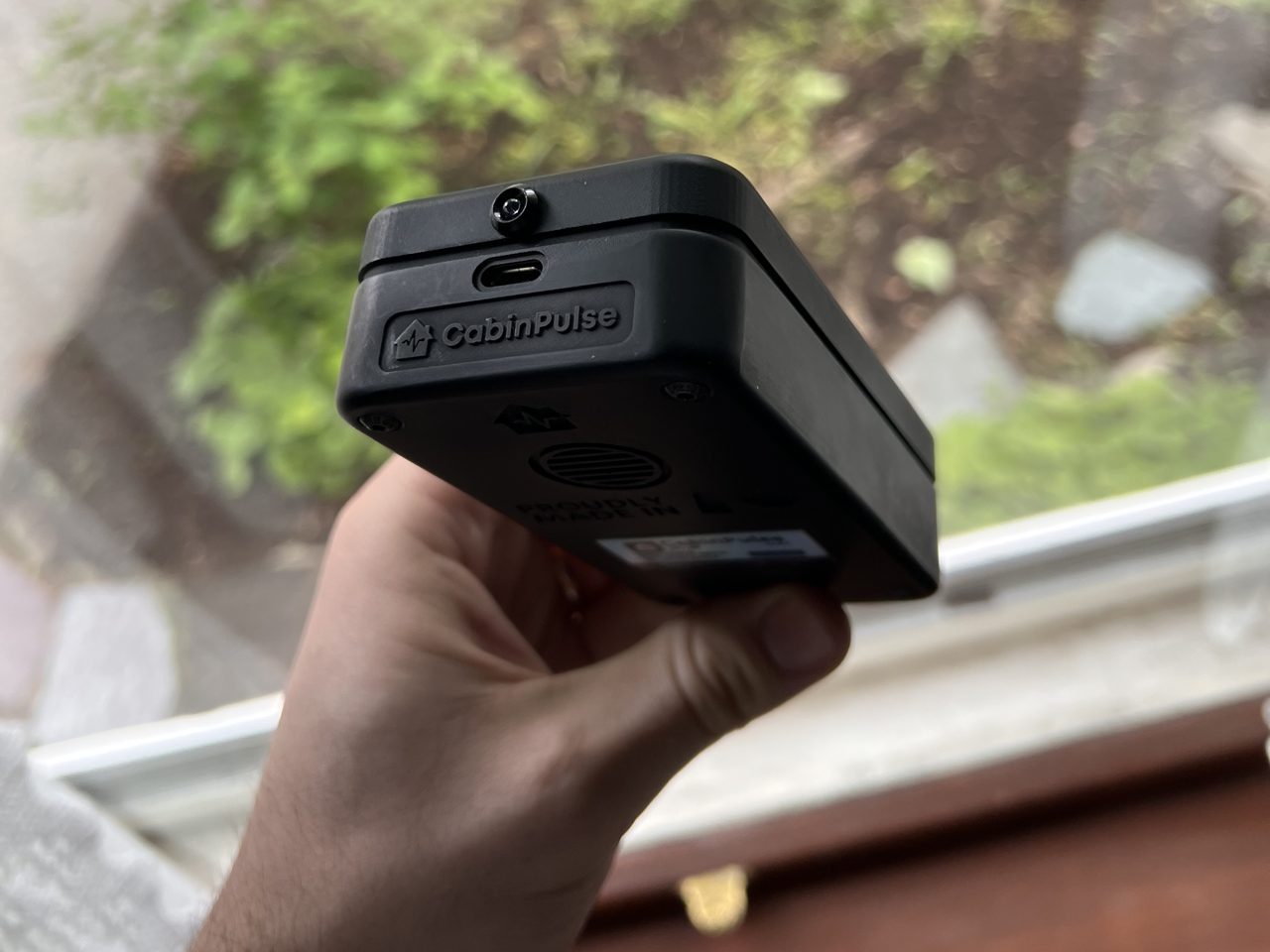
| CabinPulse Toccata Systems | Built-in cellular (LTE-M / NB-IoT); does not use Wi-Fi at all | Backup battery good for three to four days, per maker; alerts continue over cellular | Main unit monitors its room; battery add-on environment sensors (up to 5) report temperature and humidity from elsewhere | Text and email; maker says temperature and power alerts arrive within seconds | Plug-in with backup battery; add-ons on 3 AA lithium (about 2 years) | Subscription required; maker warns metal and appliances cut add-on range |
Not a ranking. Listed from simplest setup to most outage-proof. Figures are what each maker published on November 10, 2026.
Temp Stick: Wi-Fi With No Hub, and an Honest Outage Caveat
Temp Stick is a single sensor that joins your 2.4 GHz Wi-Fi and reports straight to the company's cloud, so there's no hub or gateway to buy. The maker lists a range of −40 to 140°F, a stated accuracy of ±0.15°C, and alerts by text, email or app. Two features suit a medication fridge. Multi-stage alerts let you set different thresholds for different people (you get the first warning, a family member gets the second). And what Temp Stick calls WiFi Shield sends "internet lost/found" alerts and logs readings while Wi-Fi is down, then restores them when it comes back. It runs on two AA batteries (1+ year with typical settings, per the maker) or an AC adapter, and Temp Stick says there are no fees or subscriptions. A version with an external probe is also sold.
The power-outage part comes with a condition the maker states plainly: to receive alerts during a power outage, the Temp Stick has to be plugged in (so it can notice the power drop) and your internet equipment has to be on a backup power supply. Without that, the sensor keeps logging on its batteries, but its alert has nowhere to go until the power is back. A small UPS on the modem and router fixes it.
SensorPush HT1 + WiFi Gateway: Fine-Grained History
SensorPush's HT1 is a small coin-cell sensor (about 1.6 inches square) that talks Bluetooth. On its own, it syncs to your phone when you're in range. Add a SensorPush WiFi Gateway and readings and alerts reach you from anywhere. SensorPush lists a range of −40 to 140°F, accuracy of ±0.3°C typical between 0 and 60°C, readings every minute, and over two weeks of data stored on the sensor itself. The G1 gateway connects by Wi-Fi or Ethernet, has no monthly fee, and lets several people log in to the same account. The G1 product page lists alerts as in-app push notifications, with email and SMS "coming soon"; SensorPush's support pages now point to a newer G2 gateway that runs from a USB-C charger.
SensorPush's own fridge guidance is useful whichever brand you buy. Fridge walls and food (water absorbs Bluetooth well) cut the range, so place the sensor near the door rather than against the back wall, keep the gateway relatively close to the fridge, and check that the sensor reports well next to the gateway before moving it inside and watching it for a day. In an outage, the gateway needs power and internet to alert you, but the sensor's two weeks of on-board storage mean you can usually see what happened afterward.
YoLink: A Probe That Keeps the Radio Outside, Plus a Power Fail Siren
YoLink devices use LoRa, a long-range, low-power radio, to talk to a YoLink hub, which connects to the internet; the hub is required for app readings and alerts and is sold separately. The piece that fits a medication fridge is the YS8004 Weatherproof Temperature Sensor with Probe. The probe sits inside the fridge on a 1 m (3.28 ft) cable, and the sensor body stays outside. YoLink lists the probe's typical accuracy at ±0.5°C between −10 and 47°C, a probe range of −40 to 221°F, and two lithium AAA batteries in the body. Running a thin cable past the door seal sidesteps the signal problem that comes with putting a radio inside a metal box.
YoLink also sells a Power Fail Alarm (YS7106). It plugs into the outlet you want to watch, notices when its USB power drops, and sounds a local alarm on two AA backup batteries. YoLink is careful about the limits: the app can report the power loss only while the hub and network path remain available, and the backup AAs aren't recharged by the USB supply, so they need replacing on a schedule. Put the hub and router on a UPS and the setup covers both a warm fridge and a dead outlet.
MarCELL: Cellular, With a Probe Option on the PRO
MarCELL monitors don't use your Wi-Fi or internet at all. Each has its own pre-activated cellular connection on Verizon or AT&T's 4G LTE network (you pick the version with better coverage where you live) and alerts by text, phone call or email when temperature, humidity or power leave the range you set. MarCELL says the Multisensor checks readings every 10 seconds and its internal rechargeable battery lasts up to 48 hours when fully charged. Because the device and its connection don't depend on your house's power or internet, it's one of the few ways to get a power-outage text when everything at home is dark.
Two details for a fridge. The base unit's operating range is 0 to 120°F, so it's built to sit in a room, not inside a refrigerator. The MarCELL PRO adds a detachable temperature probe (standard probe −20 to 127°F, on an 80-inch cable), which puts the reading where your pens are while the unit stays outside; MarCELL lists the PRO's battery at 36–48 hours typical and its checks at every 6 seconds. Both require a monthly subscription for the cellular connection, with no long-term contract per the maker.
CabinPulse: Cellular With the Longest Stated Backup
CabinPulse, made by Toccata Systems in Saskatoon, is a plug-in monitor with cellular built in (LTE-M and NB-IoT) that tracks temperature, power, humidity and air quality, and texts or emails you. It doesn't use Wi-Fi at all. The maker says its backup battery is good for three to four days and that it stays connected over cellular during an outage, so "a power outage is something you get told about, not something that silences the device." It says temperature and power alerts arrive within seconds, any phone that receives a text can get them, and you can add other people. It's sold in the US and Canada and requires a subscription.
The main unit monitors the room it's in. To read a separate space, CabinPulse sells battery-powered add-on environment sensors (up to five per unit, about two years on three AA lithium batteries) that report their own temperature and humidity. CabinPulse markets them for basements and rooms on a separate heating zone rather than fridges, and warns that metal and appliances cut range, so if you put one in a refrigerator, check the signal in the app before relying on it.
The Outage Problem, Solved Three Ways
| Setup | Alert reaches you in an outage if… | What to add |
|---|---|---|
| Wi-Fi sensor (Temp Stick) | The sensor is plugged in and your modem and router stay powered | A small UPS for the modem and router |
| Sensor + gateway or hub (SensorPush, YoLink) | The gateway or hub, modem and router all stay powered | A UPS covering the gateway or hub too |
| Cellular monitor (MarCELL, CabinPulse) | There's a cell signal and the device's own battery lasts | Nothing, beyond the subscription; check coverage first |
A cellular monitor still depends on the local cell network, so check coverage at your address before you buy (CabinPulse publishes a coverage checker, and MarCELL offers Verizon and AT&T versions), and don't treat any alert as guaranteed. If outages are common where you live, an alert is only half the plan; the other half is keeping the fridge cold, which our battery backup comparison covers.
Setting It Up So the Alert Means Something
- Set both a high and a low alert. Your label's refrigerated range is generally 36–46°F (2–8°C). A low alert catches a fridge set too cold before pens freeze; the storage guide has each product's details.
- Add a delay or buffer. Every door opening sends the air temperature up for a minute. Use the monitor's alert delay if it has one, or put the sensor or probe in a small bottle of water or glycol so it reads more like the pens than the air.
- Place it where the pens are. Same shelf as the pens, away from the door shelves (which see the biggest swings when the door opens) and not touching the back wall or a cooling vent.
- Test it. Leave the door open briefly, or unplug the monitored outlet, and make sure the alert arrives on every phone that should get it.
- Add a second person. Temp Stick, SensorPush, MarCELL and CabinPulse all say more than one person can get alerts; check the app settings on whichever you choose. If you travel, add someone who can get to your fridge.
- Mind the batteries. Sensor batteries drain faster in the cold. Put a reminder on your calendar to check them twice a year.
Which One Fits You
- You want simple, with no subscription: Temp Stick, or SensorPush HT1 with a gateway.
- You want detailed history to show a pharmacist: SensorPush (minute-by-minute, two weeks on the sensor) or Temp Stick's logging.
- You already use smart-home gear or want a local siren on power loss: YoLink probe sensor plus Power Fail Alarm, with the hub on a UPS.
- You need alerts when the whole house loses power and internet: MarCELL (PRO for a probe) or CabinPulse, if you have cell coverage.
After an Alert: Checking Your Pens
FDA's guidance is direct: if a medicine wasn't kept at its recommended temperature, check its storage instructions or contact a pharmacist, health care provider or the manufacturer to find out whether it can still be used. Ready.gov's general rule for outages is that refrigerated medication should be discarded if the power is out for more than a day, unless the label says otherwise. GLP-1 pens do have limited room-temperature allowances that differ by product, which our storage guide lists with label sources. The monitor's record is the best thing you can bring to that call: the highest reading, the lowest reading, and how long each lasted.
Frequently Asked Questions
What is the best way to get an alert if my medication fridge loses power while I’m away?
Use a monitor whose alert path survives the outage. Wi-Fi monitors such as Temp Stick and hub systems such as YoLink can report a power loss, but only while your modem, router (and hub) still have power, so put them on a small UPS. Cellular monitors such as MarCELL and CabinPulse don’t use your internet at all and run on an internal battery (MarCELL up to 48 hours, CabinPulse three to four days, per the makers), so they can still text you when the whole house is dark. Both need a subscription.
What temperature should I set the alert at for GLP-1 pens?
Match the alerts to your label’s refrigerated range. Unused GLP-1 pens are generally labeled for 36–46°F (2–8°C), and labels say not to use a pen that has frozen, so set a high alert near 46°F and a low alert a little above 32°F (a low alert at 36°F catches a fridge that’s running too cold before anything freezes). Add a short delay if your monitor allows it, so opening the door doesn’t set it off. Your label and pharmacist set the actual limits.
Does a Wi-Fi fridge sensor work during a power outage?
The sensor itself usually keeps running on batteries, but its alert has to travel through your router and internet connection, which go down with the power unless they’re on a battery backup. Temp Stick says this directly: to get power-outage alerts you need the Temp Stick plugged in and your internet equipment on a UPS. Some sensors keep logging while offline and upload later, which helps you work out what happened afterward.
Can I put a wireless sensor inside the fridge?
Yes, but the fridge’s metal walls, insulation and the water in food all weaken the signal. SensorPush recommends placing the sensor near the door and the gateway close to the fridge, and testing it for a day. A probe-style sensor, like YoLink’s YS8004 or MarCELL PRO’s probe, avoids the problem by keeping the radio outside and running only a thin cable past the door seal.
Do these monitors replace a thermometer in the fridge?
They do the same job and more, since they record history and send alerts. Many people still keep a simple min/max thermometer as a second check that doesn’t depend on batteries, an app or a signal. Our fridge thermometer comparison covers those.
I got an alert and the fridge was out of range for hours. Can I still use my pens?
Don’t guess. FDA says that if a medicine wasn’t kept at its recommended temperature, check its storage instructions or contact a pharmacist, health care provider or the manufacturer. The monitor’s history is useful here: note the highest and lowest readings and how long they lasted, and have that ready when you call.
Sources
- Temp Stick — Temp Stick with AC power (specs, outage requirements, FAQ)
- SensorPush — HT1 Temperature and Humidity Smart Sensor
- SensorPush — G1 WiFi Gateway
- SensorPush Support — Using SensorPush in a refrigerator or freezer
- YoLink — Weatherproof Temperature Sensor with Probe (YS8004)
- YoLink — Power Fail Alarm (YS7106)
- MarCELL — Multisensor (specs and FAQ)
- MarCELL PRO — Specifications
- CabinPulse — Frequently Asked Questions
- CabinPulse — Add-ons
- Ready.gov — Power Outages
- FDA — Safe Drug Use After a Natural Disaster